
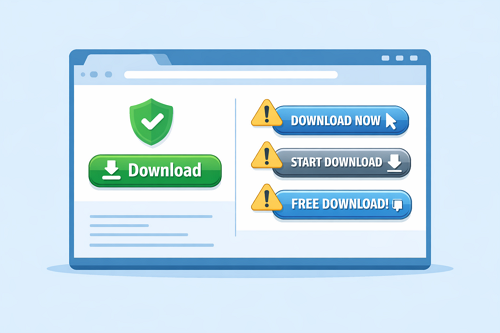
How to Spot Real Download Buttons and Avoid Fake Ones on File Hosting Sites
Downloading files from Keep2Share and other file hosting platforms is quick and convenient, but it’s important to know which download button is legitimate. Some websites display advertisements that closely resemble real download buttons, making it easy to click the wrong one. Learning how to identify authentic download links helps protect your device, personal information, and browsing experience.
-> Go to k2s.cc and create Premium Account
Why Fake Download Buttons Appear
Many file hosting services rely on advertising to support their platforms. Unfortunately, some advertisements are designed to imitate genuine download controls.
Clicking a fake button may result in:
- Unwanted software installations
- Suspicious browser extensions
- Phishing websites requesting personal information
- Malware or potentially harmful downloads
- Annoying pop-ups and unwanted redirects
If you download files regularly, consider creating a Keep2Share Premium account through the official website for a cleaner experience with fewer interruptions.
Real vs. Fake Download Buttons
| Feature | Real Download Button | Fake Download Button |
|---|---|---|
| Matches the selected file | ✔ Yes | ✘ Usually no |
| Starts the file download | ✔ Yes | ✘ Often redirects |
| Located near file information | ✔ Yes | ✘ Commonly inside ads |
| Requires extra software | ✘ No | ✔ Often yes |
| Design | Simple and consistent | Flashy or animated |
Tips for Safer Downloads
- Confirm the file name before clicking Download.
- Hover over links to check the destination URL.
- Keep your browser and antivirus software updated.
- Avoid sponsored advertisements that imitate download buttons.
- Download files only from trusted uploaders whenever possible.
Download with Confidence
A few extra seconds of checking a page can prevent security issues and unwanted software. By recognizing the difference between genuine and misleading download buttons, you can enjoy a safer and more reliable file-sharing experience.
If you’d like smoother playback before downloading files, be sure to read our guide on streaming videos smoothly on Keep2Share for helpful tips and best practices.
-> Go to k2s.cc and create Premium Account

